
Everything you need to organize, search, share, and protect your engineering documents
Unlimited nested folders with automatic creation from metadata. Drag-and-drop organization, color-coded folders, and breadcrumb navigation
Side-by-side, overlay, and diff-only modes with instant client-side processing — plus AI Analysis: Claude describes each change with severity and category, from breaker ratings to revision clouds
Claude AI automatically classifies documents, extracts structured data, generates summaries, and enables document Q&A
Draw, annotate, and markup PDFs and images directly in the browser. Freehand pen, lines, arrows, rectangles, text annotations with color selection
Automatic versioning with full revision history. Compare versions side-by-side with visual diff, track changes, restore any previous version
Full-text OCR search, metadata filtering, AI-powered classification, natural language queries, and saved searches
Role-based access control, file-level permissions, secure share links, and complete audit logs
View PDFs, DWG files, images, Office documents and text files directly in browser. No downloads or special software required. Email, RTF, DXF and ZIP archives are stored as-is and download with one click.
30-day automatic retention for deleted files. Restore accidentally deleted documents with one click
Upload, delete, download, update metadata, grant permissions, and process AI on multiple files simultaneously
Organization-wide activity streams, threaded comments, @mentions, and real-time notifications
AES-256 encryption, TLS 1.3 in transit, geographic redundancy, and 99.999999999% durability
Save drawing sets to your device and view PDFs and images with no connection. Recently viewed documents are kept automatically; install on a tablet or phone like a native app
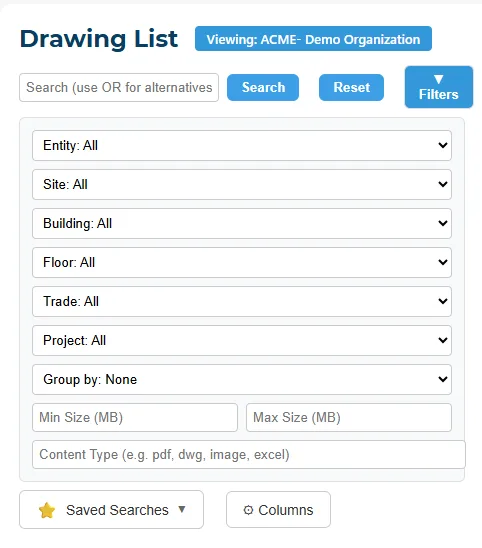
Slice your document library the way your buildings are actually organized — entity, site, building, floor, trade, and project — then narrow by content type or size, group results, and save the searches you run every week. Finding the Level 3 electrical drawings takes seconds, not a folder expedition.
Professional drawing management and distribution for construction projects
Organize drawings into sets and distribute with professional transmittals
RFIs, submittals, and punch lists live in the same system as your drawings — so questions link to the exact sheet, approvals land in the record, and nothing sits in an inbox
A central numbered RFI log with ball-in-court tracking, due dates, email notifications, overdue metrics, and answers that live with the record set
A numbered submittal register with spec sections, revision cycles, approval workflows (approve / approve as noted / revise & resubmit / reject), and one-click AI spec-compliance review
Log items fast during walkthroughs with locations, trades, priorities, and photos — then track each one to verified completion with a reject-and-reopen inspection loop
Included in the Professional plan. Read the launch announcement
Automatically compare submittals against specifications using Claude AI. Catch compliance issues before they become costly problems.
Upload specification documents and submittals. Our AI reads both and identifies potential compliance issues automatically.
Organize reviews by CSI MasterFormat divisions. Track submittals across all 50 divisions from General Requirements to Process Equipment.
Issues categorized as Critical, Major, Minor, or Info. Focus your review time on what matters most.
Generate professional compliance reports in PDF, Word, or Excel format. Share findings with contractors and stakeholders.
Track finding status from Open to Acknowledged to Resolved. Filter by status to see outstanding issues at a glance.
Add your own findings alongside AI-generated ones. Edit, comment, and manage all compliance issues in one place.
See how ArchiveView can transform your document management